
A school library plays an important role in developing students’ reading habits, supporting academic learning, and encouraging independent research. However, managing hundreds or thousands of books, student records, borrowing activities, and overdue returns can become challenging when the library relies entirely on manual registers and spreadsheets.
As schools adopt digital solutions in 2026, library management is becoming an important part of creating a more organized learning environment. The right school library management software can help librarians maintain accurate records, simplify everyday tasks, and make library resources easier for students and teachers to access.
But with different solutions offering different capabilities, how can a school choose the right one?
The answer depends on the school’s requirements, library size, existing technology, and long-term goals. Before making a decision, administrators should understand the essential features that make library operations more efficient and convenient.
In this guide, we explain seven essential features to compare, the benefits they offer, and the practical factors schools should evaluate before choosing a library management solution.
Why Do Schools Need Digital Library Management in 2026?
Traditional library management often involves maintaining registers, manually searching catalogues, recording book transactions, and checking due dates. These activities can consume valuable time and make it difficult to maintain consistent records.
A digital solution brings these processes into a centralized system. Librarians can organize book information, manage student borrowing records, check availability, and monitor returns without depending entirely on paper-based documentation.
For schools, the benefits can include:
- Reduced manual data entry and repetitive administrative work.
- Faster access to book records and availability information.
- Better visibility into issued, returned, and overdue books.
- More organized student and teacher borrowing records.
- Improved coordination between librarians and school administrators.
- Greater accessibility to library information, depending on the system’s capabilities.
The goal is not simply to replace registers with computers. It is to create a reliable process that helps the library serve students and teachers more effectively.
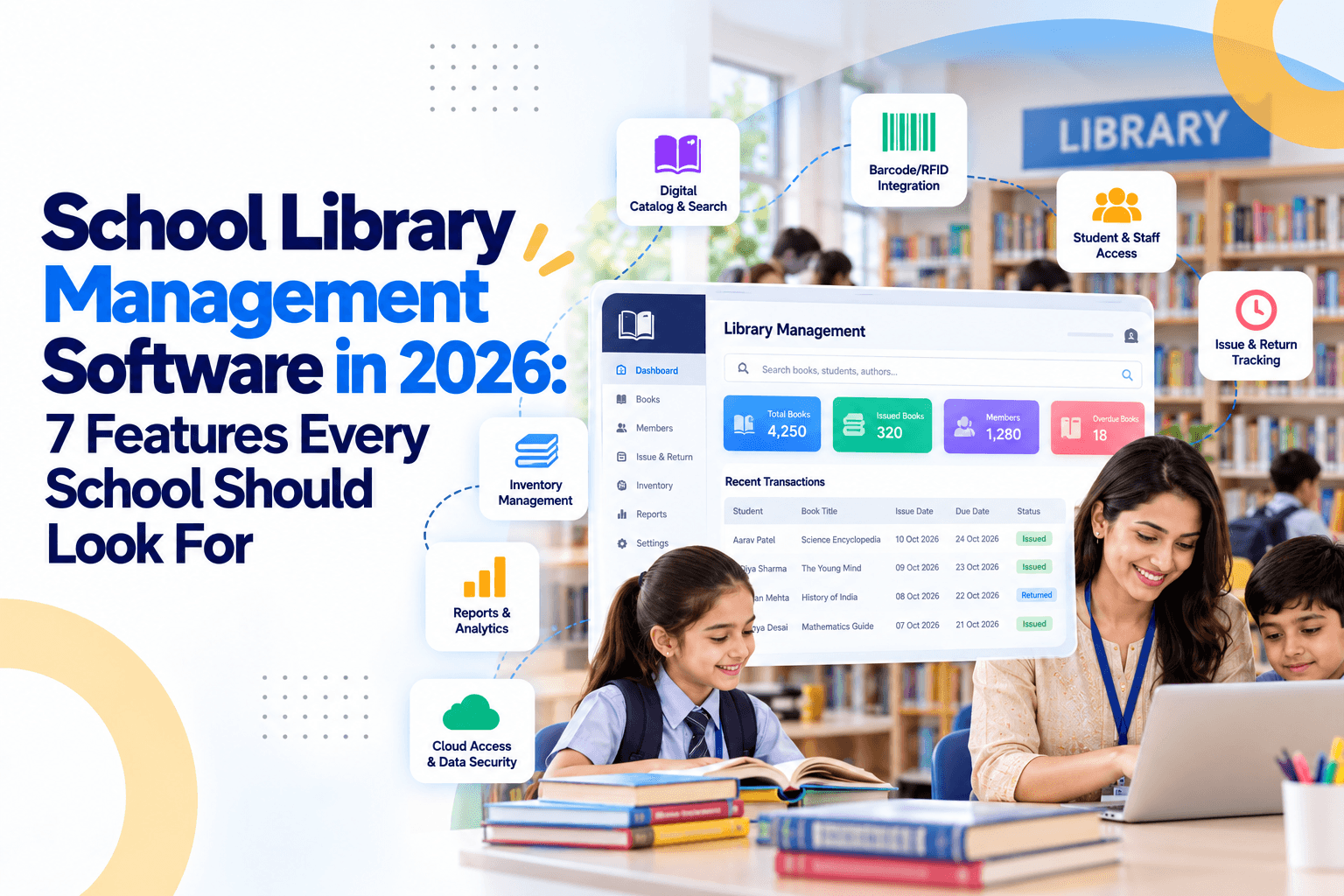
7 Features Every School Should Look For
Explore the fundamental modules that make a school library management system reliable, fast, and scalable for modern educational institutions in 2026.
Centralized Book Catalogue and Easy Search
A well-organized catalogue is the foundation of an efficient school library. When book information is scattered across registers or separate spreadsheets, locating a particular title can take unnecessary time.
Look for a system that allows librarians to maintain a central catalogue containing essential details such as book title, author, publisher, edition, ISBN, category, and available copies.
Search functionality is equally important. Librarians should be able to find books using relevant information rather than browsing through lengthy lists manually.
Useful catalogue features include:
- Search by title, author, ISBN, or subject.
- Classification by subject, category, grade, or reading level.
- Separate records for multiple copies of the same book.
- Clear visibility into available and currently issued copies.
- Options to update book information when required.
For example, if a teacher needs reference books for a science project, the librarian can search the catalogue and identify relevant titles more efficiently.
When evaluating school library software, check whether its search and classification options match your existing collection. A simple, accurate catalogue makes the rest of the library workflow easier to manage.
Automated Book Issue and Return Management
Issuing and returning books are among the most frequent library activities. Recording every transaction manually can create delays, especially during busy periods such as examination preparation or the start of a school term.
A good solution should simplify the complete borrowing process. Librarians should be able to identify the borrower, select the book, record the transaction, and update its availability.
The system should ideally support:
- Recording issue dates and expected return dates.
- Updating book availability after each transaction.
- Maintaining borrowing histories for students and teachers.
- Processing returned books without duplicate manual entries.
- Identifying overdue items through reports or alerts.
- Applying borrowing limits according to school policies, where supported.
This is where book issue and return software becomes useful. It helps maintain consistent transaction records and reduces the chances of books being marked as available when they are still issued.
Before selecting a solution, ask whether it supports your school's borrowing rules, including different limits or loan periods for students, teachers, and library categories.
Barcode Scanning and Faster Library Transactions
Barcode functionality can make routine library operations quicker and more consistent. Instead of entering book details manually for every transaction, librarians can scan a book’s barcode to identify the correct record.
When combined with borrower identification, scanning can reduce repetitive typing and help prevent errors caused by entering book titles or identification numbers incorrectly.
Important capabilities to check include:
- Barcode generation or support for existing book barcodes.
- Compatibility with suitable barcode scanners.
- Quick identification of books during issue and return.
- Unique identification of individual copies.
- Support for inventory verification using scanning, if available.
For example, a school with multiple copies of the same textbook needs to distinguish between individual copies when recording transactions. A suitable identification process helps librarians track each copy more accurately.
Schools should also check whether barcode scanners, printers, or other required equipment need to be purchased separately. Understanding these requirements in advance helps avoid unexpected implementation costs.
Student and Teacher Record Integration
Library records are closely connected to the people borrowing the books. Maintaining borrower information separately from school records can result in duplicate data entry and outdated details.
A useful school library management system should allow librarians to maintain organized borrower profiles and associate each transaction with the correct student or teacher.
Depending on the solution, this may include:
- Student names, admission numbers, and class details.
- Teacher and staff borrowing records.
- Individual borrowing histories.
- Borrowing limits based on school rules.
- Integration with the school's existing student information system.
- Updates to borrower records when classes or academic years change.
Integration deserves particular attention. Some systems may offer built-in student records, while others may connect with existing school management platforms through supported integrations.
For schools already using digital administration tools, compatibility can reduce duplicated work across departments. However, administrators should verify which integrations are actually available rather than assuming every platform connects automatically.
Access permissions are also important. Staff should be able to view or update only the information relevant to their responsibilities.
Overdue Book Alerts and Notifications
Books that are not returned on time can become unavailable to other students. Without a reliable reminder process, librarians may need to review registers manually and contact borrowers individually.
A digital system can make overdue management more structured by identifying books that have passed their due dates and generating reminders where supported.
Look for features such as:
- Automatic identification of overdue books.
- Due-date reports for librarians.
- Email, SMS, or app notifications, depending on available integrations.
- Configurable reminder schedules.
- Records of issued books awaiting return.
- Support for school-defined overdue policies.
For instance, a librarian may want to identify all overdue books before the weekly library period. A report can help prioritise follow-ups without checking every borrowing record individually.
Schools should confirm whether notifications are included in the software package or require additional services or charges. They should also check whether contact information is maintained accurately and whether the school can control notification frequency.
The objective is to encourage timely returns while keeping communication simple for students, parents, teachers, and library staff.
Inventory Tracking and Library Reports
Knowing how many books a school owns is not enough. Librarians also need to understand where individual books are recorded, which items are issued, and which books may be missing, damaged, or unavailable.
A reliable library book tracking system should help schools maintain visibility over their collections and identify discrepancies between recorded inventory and physical books.
Useful inventory and reporting capabilities include:
- Total books and individual copies recorded in the catalogue.
- Available, issued, overdue, and damaged book records.
- Category-wise and subject-wise collection reports.
- Issue and return activity over a selected period.
- Borrowing histories and frequently borrowed titles.
- Inventory verification and missing-book reports, where supported.
These reports can support practical decisions. If certain subjects have high borrowing activity, administrators may consider adding more relevant titles. If books remain unused for long periods, the school can review whether they are appropriate for current student needs.
Accurate inventory records also help during annual library audits and academic-year transitions.
Before purchasing a solution, review sample reports and check whether data can be exported in formats suitable for your school’s record-keeping requirements.
User-Friendly Interface, Security, and Scalability
Even a feature-rich system can create problems if librarians find it difficult to use. Schools should prioritise a clear interface, straightforward workflows, and dependable access to important functions.
A practical solution should help staff complete everyday tasks without requiring complicated procedures for routine transactions.
Ease of use
Can librarians learn the system quickly? Are common tasks accessible without navigating through too many screens?
Data security
Does the system provide role-based access, secure authentication, appropriate backups, and clear data protection practices?
Accessibility
Can authorized users access library information from the devices and locations supported by the software?
Scalability
Can the solution accommodate additional books, students, branches, or libraries as the school grows?
Support and training
Does the provider offer onboarding, documentation, technical assistance, and a clear process for resolving issues?
Cost transparency
Are implementation, training, maintenance, equipment, and recurring charges explained clearly?
Schools should also understand how their information will be backed up, exported, and recovered if access is interrupted. For cloud-based systems, ask about hosting, data ownership, recovery procedures, and service availability.
Choosing a solution that fits current needs while allowing reasonable future growth can reduce the need for another transition later.
How to Choose the Right Library Software for Your School
Before comparing providers of library management software for schools, prepare a checklist of your library's actual requirements. A small primary school may need straightforward cataloguing and borrowing records, while a large secondary school may require barcode scanning, detailed reports, integrations, and more advanced access controls.
Use the following steps to evaluate your options:
Assess your current process
Identify difficulties with cataloguing, issuing books, returns, inventory, and reporting.
Prioritise essential features
Separate must-have capabilities from optional features that may be useful later.
Request a product demonstration
Ask the provider to demonstrate real workflows using examples relevant to your school.
Verify compatibility
Confirm support for your devices, existing student records, scanners, and other required equipment.
Review pricing and support
Understand the total cost, training arrangements, maintenance, and available technical assistance.
Check data security and migration
Determine how existing records will be transferred, protected, exported, and backed up.
Run a practical trial if available
Let librarians test common tasks before committing to a solution.
When evaluating library automation software for schools, prioritise solutions that simplify cataloguing, book circulation, overdue tracking, and inventory reporting while keeping everyday library tasks easy to manage.
Common Mistakes to Avoid When Selecting Library Software
A few common mistakes can make implementation more difficult than necessary:
Choosing based only on price
A low initial cost may not include training, support, integrations, or required equipment.
Ignoring staff requirements
Librarians should be involved in the evaluation because they will use the system regularly.
Overlooking data migration
Existing book and borrower records need a clear transfer and verification process.
Assuming every feature is included
Barcode support, notifications, integrations, and advanced reports may depend on the plan selected.
Neglecting security
Student information should be protected through appropriate access controls and data-handling practices.
Skipping testing
A demonstration or trial can reveal usability problems before implementation.
Careful planning helps schools choose a solution that addresses real operational challenges rather than paying for features they may never use.
Conclusion
A well-managed school library gives students better opportunities to discover books, develop reading habits, and explore subjects beyond their classroom lessons. The right digital solution can help librarians organize collections, manage borrowing activities, monitor overdue books, and maintain accurate inventory records.
In 2026, schools should focus on seven essentials: a searchable catalogue, efficient issue and return workflows, barcode support, organized borrower records, overdue reminders, inventory reporting, and a secure, user-friendly platform that can grow with the institution.
The best choice is not necessarily the software with the longest feature list. It is the one that fits your school's needs, simplifies daily work, protects information, and makes library resources easier to manage over time.
Before making a final decision, list your library's essential requirements and compare available solutions through a product demonstration or trial. This will help you determine which features best match your school's daily operations, budget, and future needs.
Padhalo Editorial Team
October 12, 2026