School Fee Management Software

School Fee Management Software for Schools

Simplify school fee collection, track outstanding dues, and manage student payments with Padhalo. Our school fee management software helps schools organize fee structures, monitor payment status, manage installments, issue digital receipts, and review collection reports from a centralized system.

Instead of relying on disconnected spreadsheets, paper registers, and repeated manual follow-ups, your accounts team can work with organized fee records and help parents stay informed about payment deadlines. Give your school a more structured approach to financial administration with Padhalo.

  • Organized Fee Structures
  • Digital Receipts & Installments
  • Automated Due Reminders

Book a Free Demo to explore how Padhalo can support your school's fee management workflow.
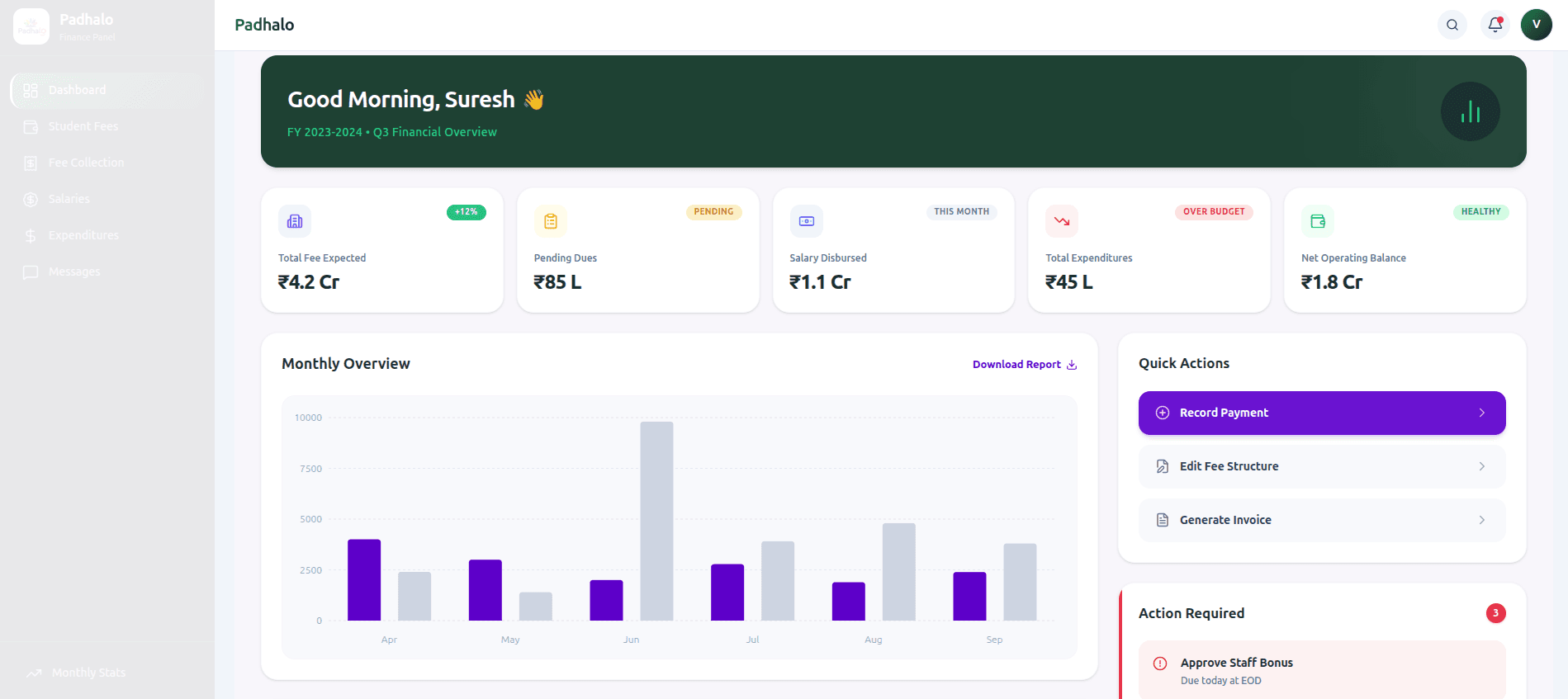
Padhalo School Fee Management Software financial dashboard
  • Fee StructuresFlexible Slabs
  • Online PaymentsInstant Settlement
  • Pending DuesReal-Time Tracking
  • Parent RemindersDue Notifications
  • Digital ReceiptsInstant PDF Records
  • Installment PlansPartial Payments
  • Financial ReportsCollection Audits
  • 100%Digital Receipts
  • Real-TimeDues Tracking
  • Role-BasedAccounts Access
  • 24/7Parent App Access
Financial Administration

Simplify School Fee Collection and Financial Administration

Managing school fees involves multiple activities, from setting up fee structures and recording payments to following up on outstanding amounts and preparing collection reports.

When these tasks are handled manually, accounts teams may spend significant time updating records, checking payment histories, and responding to parents' fee-related questions.

Padhalo helps bring these activities into a more organized workflow. With a centralized school fee management system, authorized staff can review applicable fees, monitor payment records, and identify outstanding balances more conveniently.

Whether your school manages tuition fees, transport charges, or other applicable fees, the workflow can be organized according to your institution's policies and the features enabled in your Padhalo account.

Centralized Fee Hub

Structured workflows for accounts & finance

  • Tuition Fee Structures & Grade Slabs
  • Transport Charges & Route-Wise Slabs
  • Admission & Registration Fees
  • Installments & Partial Payment Tracking
  • Sibling & Merit Concession Management
  • Late Fine & Due Date Rules Configuration
  • Instant Digital Receipts & Email PDF
  • Bank Reconciliation & Collection Reports
Accurate Payment TrackingZero Manual Math
Core Financial Capabilities

Key Features of Padhalo Fee Management Software

Manage supported fee structures, collections, parent notifications, receipts, and reporting through a centralized process.

1

1. Flexible School Fee Structure Management

Every school may have different fee categories, payment schedules, and concession policies. A structured fee management process helps organize these requirements and maintain consistent student fee records. With Padhalo, schools can manage supported fee structures according to their administrative requirements.

  • Organize applicable fee categories and charges.
  • Maintain student-wise fee information.
  • Configure fee deadlines according to school policies.
  • Manage supported discounts and concessions.
  • Review fee records throughout the academic year.

How this helps: Your accounts team can access organized fee information and reduce dependence on separate registers for routine fee administration.

2

2. Online Fee Collection and Payment Tracking

Keeping track of payments is essential for maintaining accurate fee records. Padhalo supports online fee payment workflows through the payment options enabled for your school. Parents can access available fee information and use supported payment methods, while authorized staff can review recorded payments and outstanding balances.

  • Track recorded fee payments.
  • Review outstanding amounts and payment status.
  • Maintain organized collection records.
  • Support available online payment options.
  • Access relevant payment information for administrative review.

How this helps: A centralized view of payment records makes it easier to check fee status and identify payments that require attention.

Payment methods and gateway integrations depend on your school's configuration. Confirm the availability of UPI and specific payment providers before publishing those claims.
3

3. Fee Reminders and Parent Notifications

Following up with parents about payment deadlines can become repetitive when every reminder must be sent manually. Padhalo supports configured fee reminders through available notification channels, helping schools communicate upcoming deadlines and pending dues.

  • Remind parents about upcoming fee deadlines.
  • Communicate outstanding dues according to school policies.
  • Reduce repetitive manual follow-ups.
  • Help parents stay informed about payment requirements.

How this helps: Your accounts team can organize fee-related communication more efficiently, while parents receive relevant payment information through supported channels.

The availability of automated scheduling and specific notification methods depends on the features enabled in your account.
4

4. Installment and Partial Payment Tracking

Some schools allow parents to pay eligible fees in installments or make partial payments under approved arrangements. Padhalo supports installment and partial payment tracking, helping accounts teams review payments received, remaining balances, and progress against applicable fee records.

  • Track supported installment arrangements.
  • Record partial payments where enabled.
  • Review remaining fee balances.
  • Maintain student-wise payment histories.
  • Identify records that require follow-up.

How this helps: Staff can understand how much has been paid and how much remains outstanding without repeatedly reconstructing payment histories.

5

5. Digital Fee Receipts and Payment Records

Parents and school accounts teams need reliable records of completed transactions. Digital receipt generation helps organize payment documentation and makes relevant records easier to retrieve. Padhalo supports digital receipt generation for recorded payments.

  • Generate digital receipts for recorded transactions.
  • Maintain organized fee payment records.
  • Help parents access available payment information.
  • Reduce dependence on paper receipt registers.
  • Retrieve payment details when required.

How this helps: Organized digital records can make routine receipt verification and fee-related queries easier to manage.

Receipt downloads, delivery methods, and available formats depend on the configured features.
6

6. Late Fees, Discounts, and Concessions

Schools may apply late fees, eligible concessions, or discounts according to their fee policies. Maintaining these rules consistently helps keep fee records aligned with the school's administrative requirements. Use the supported configuration options in Padhalo to manage applicable fee adjustments.

  • Maintain eligible student concessions.
  • Manage supported discounts.
  • Configure applicable late fee rules where available.
  • Review adjusted fee balances.
  • Keep fee records aligned with school policies.

How this helps: A structured approach makes it easier for accounts staff to review applicable charges and explain fee calculations to parents.

Verify the exact late fee, sibling discount, and concession capabilities available in your current Padhalo version before publishing specific automation claims.
7

7. Outstanding Fee and Pending Dues Tracking

Identifying unpaid fees helps schools plan follow-ups and maintain visibility into collection progress. Padhalo helps authorized staff review outstanding fee information and identify records requiring attention.

  • Review pending student fees.
  • Track unpaid balances.
  • Monitor collection progress.
  • Identify records requiring follow-up.
  • Organize outstanding fee information for administrative review.

How this helps: Accounts teams can prioritize follow-ups based on available payment records rather than manually checking multiple sources.

8

8. School Fee Collection Reports

Fee collection reports help administrators understand recorded payments, outstanding dues, and the overall status of fee administration. Padhalo provides fee collection reporting capabilities that help authorized users review available financial records.

  • Review fee collection summaries.
  • Check student-wise payment records.
  • Monitor outstanding dues.
  • Organize information for routine financial reviews.
  • Support fee reconciliation and reporting workflows.

How this helps: Organized reporting information gives school administrators a clearer view of fee collection activity and the records that require further attention.

The reports available depend on your configured modules and reporting options.
Institutional Benefits

How School Fee Management Software Helps Your School

Spend Less Time on Repetitive Administration

Centralized fee records and payment tracking can reduce the need to update the same information across separate spreadsheets and registers.

Improve Visibility into Pending Fees

Organized outstanding balance information helps accounts staff identify unpaid fees and plan timely follow-ups.

Make Fee Information Easier for Parents to Access

The supported parent-facing experience helps parents review available fee details, payment information, and digital receipts.

Support More Organized Financial Reviews

Collection records and available reports help administrators review payment activity and prepare routine financial summaries.

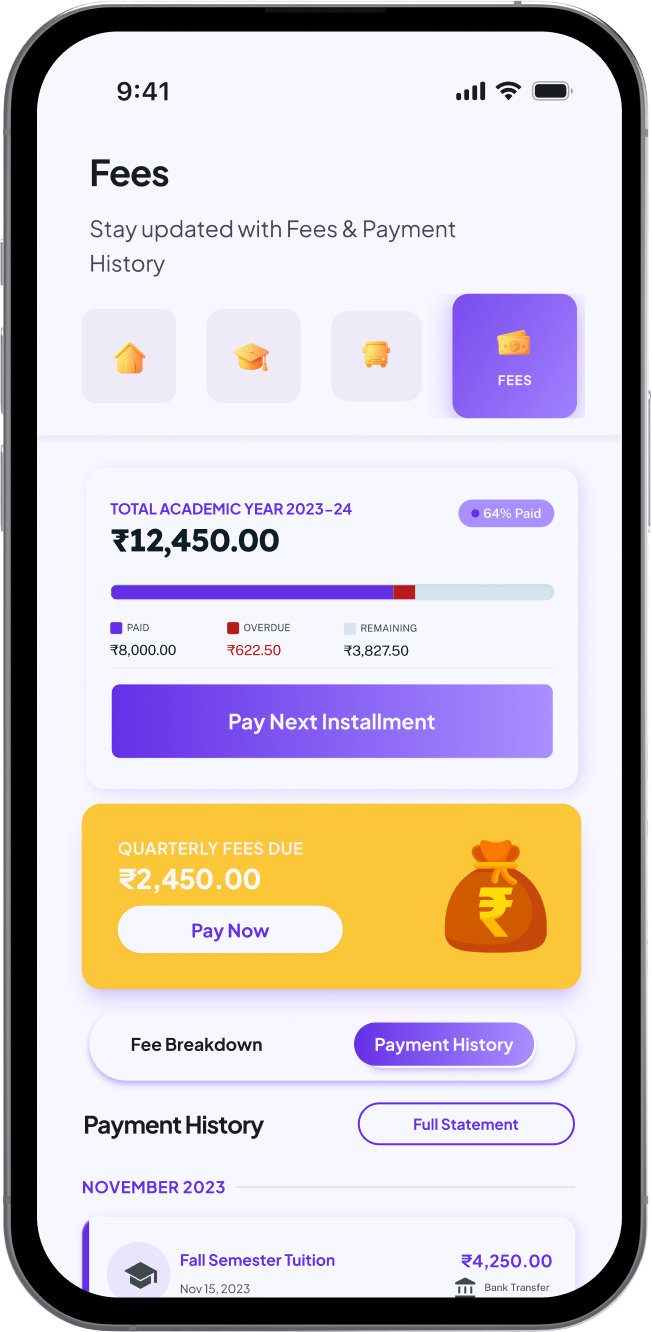
Padhalo parent fee app viewPadhalo parent fee payment receipt view
Parent App Experience

A Convenient Fee Management Experience for Parents

Parents need clear information about applicable fees, payment deadlines, and completed transactions.

Through the supported Padhalo parent app experience, parents can access available fee details and payment information through the school mobile app without depending entirely on visits to the school office.

Depending on the features enabled by the school, parents may be able to:

  • View applicable fees and outstanding dues.
  • Check available payment information.
  • Make payments through supported online options.
  • Access available digital receipts.
  • Receive configured fee notifications.

This helps schools make fee-related communication more accessible while giving parents a clearer view of their payment responsibilities.

Simple 5-Step Process

How Padhalo School Fee Management Works

The fee management workflow can be presented in five simple steps.

Step 101

Configure Fee Structures

Set up applicable fee categories, charges, payment deadlines, and supported concessions according to school policies.

Step 202

Maintain Student Fee Records

Organize student-wise fee information so authorized staff can review applicable charges and payment obligations.

Step 303

Record and Track Payments

Review recorded transactions, outstanding balances, and supported installment arrangements.

Step 404

Communicate Payment Reminders

Use available reminder options to inform parents about upcoming deadlines and pending fees.

Step 505

Review Receipts and Collection Reports

Access available transaction records, digital receipts, and reports to support routine financial administration.

Evaluation Considerations

Why Choose Padhalo for School Fee Management?

Choosing fee management software involves more than comparing feature lists. Schools need to understand how the software fits their existing processes, what support is available, and which capabilities are included in their configuration.

Padhalo combines fee management with a broader school management software platform, allowing schools to explore connected administrative workflows.

When evaluating Padhalo, consider the following:

Connected school operations

Explore how fee management fits alongside other school administration modules.

Organized payment records

Review how student-wise fee information and recorded transactions are managed.

Parent-facing access

Understand how parents access the fee information available through the configured app.

Implementation requirements

Discuss your school's existing fee structure, data migration needs, and setup process during the demo.

Payment integrations

Confirm which payment gateways and payment methods are supported for your school.

Support and onboarding

Ask about available onboarding assistance, staff training, and ongoing support arrangements.

These details help your school evaluate whether Padhalo is suitable for its fee administration requirements.

Institutions We Serve

Who Can Benefit from School Fee Management Software?

Private and Self-Financed Schools

Organize tuition fees, additional charges, payment records, and outstanding dues through a structured fee management workflow.

CBSE and ICSE Schools

Maintain fee records and payment workflows according to the school's applicable policies and administrative requirements.

Schools With Multiple Classes or Sections

Organize fee information across supported grades, classes, and student groups.

Schools Moving Away from Manual Fee Registers

Centralize fee information and reduce dependence on disconnected spreadsheets and paper-based tracking.

Fee FAQ

Frequently Asked Questions

School fee management software helps schools organize fee structures, student payment records, outstanding dues, receipts, reminders, and collection reports through a centralized system.
It helps accounts teams organize payment information, monitor pending fees, manage supported installment arrangements, and reduce repetitive administrative work.
Parents can use the online payment options enabled by their school, subject to the payment gateways and features supported by the software configuration.
Yes. Padhalo supports outstanding fee tracking, helping authorized staff review unpaid balances and identify records requiring follow-up.
Padhalo supports installment and partial payment tracking. Available configurations should be confirmed with your school's current setup and fee policies.
Padhalo supports digital receipt generation for recorded payments. Available receipt formats and delivery options depend on the configured features.
Padhalo supports configured fee reminders through available notification channels. The school's reminder rules and enabled communication options determine how these are delivered.
Pricing depends on the plan, modules, and requirements applicable to your school. Contact the Padhalo team to discuss your needs and request current pricing information.
Implementation time depends on the school's fee structure, data readiness, configuration requirements, and onboarding process. Discuss your school's requirements with the Padhalo team to understand the expected timeline.
Available payment methods depend on the payment integrations enabled for your school. Contact the Padhalo team to confirm supported gateways and whether specific options, such as UPI, are available.
Padhalo is a broader school management platform that includes fee management alongside other academic and administrative modules. Available workflows depend on your school's configuration.

Simplify Your School's Fee Management with Padhalo

Make fee records easier to organize, monitor outstanding dues, and give parents a more convenient way to access their payment information.

Explore how Padhalo can support your school's fee collection and financial administration workflows.

Book a Free Demo to discuss your school's fee management requirements and explore the available features.